Flagsmith Platform Architecture
Flagsmith architecture supports a range of deployment models to suit different organisational needs, from fully managed SaaS to self-hosted and on-premises solutions.
Conceptual Overview
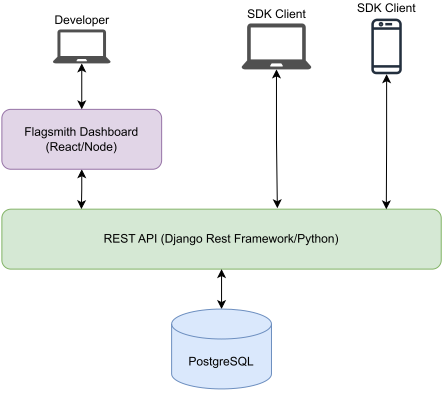
The most important components in Flagsmith's architecture are:
- Frontend dashboard: A web interface for managing projects, environments, feature flags, and user permissions. This is where most configuration and management tasks are performed.
- Core API: RESTful API that powers the dashboard and SDKs. These endpoints are used for automation, integrations, and direct management of Flagsmith resources.
- Edge API: A globally distributed API for low-latency flag evaluation, especially useful for applications with users around the world.
- SDKs: Client libraries (available for many languages and platforms) that connect your applications and services to Flagsmith, enabling real-time feature flag evaluation and remote configuration.
- Integrations: Optional connectors to third-party tools and services (e.g., analytics, notifications, monitoring). These can be configured via the dashboard or API.
- Database: Stores all persistent data, such as organisations, projects, features, and audit logs. Managed by Flagsmith in SaaS, but by your team in self-hosted/on-prem deployments.
- Ingestion server and Kafka: Receive experiment events from SDKs and hold them until they are delivered to a warehouse.
- Warehouse: Stores experiment events and serves the queries behind experiment results.
The architecture is REST-based, with both SDK clients and the dashboard interacting with the Core API. The platform is designed to be cloud-native, supporting containerisation and orchestration for scalability and reliability.
Experimentation Architecture
Experiments need exposure and conversion events from your application. These travel through a separate event pipeline into a data warehouse, where the Core API queries them to compute experiment results.

The diagram above shows how experiment events flow from your application to the warehouse, and how the Core API reads results back.
| Component | Role |
|---|---|
| Ingestion server | Checks each event batch's environment key, validates the events, and writes them to Kafka. |
| Kafka | Holds events between ingestion and delivery, so a slow or unavailable warehouse does not lose events. |
| Warehouse delivery | Inserts events into each environment's warehouse, retries failed inserts, and records delivery status. |
| Warehouse | Stores events. The Core API queries it for experiment results. |
How this differs by deployment model:
- SaaS: Flagsmith runs the whole pipeline, including a managed ClickHouse warehouse that reads events directly from Kafka. You can also connect your own warehouse.
- Self-hosted: You run the ingestion server, Kafka and warehouse delivery, and connect each environment to a warehouse you run. See Connect a Warehouse for supported warehouses.
Deployment Models
Flagsmith can be deployed in three main ways, each with conceptual differences in management, control, and responsibility. The following diagrams illustrate the architecture for each model:
1. SaaS (Cloud-Hosted)
- Managed by Flagsmith: No infrastructure to manage; get started instantly.
- Automatic scaling, security, and updates: All handled by the Flagsmith team.
- Global Edge API: Provides low-latency flag delivery worldwide.
- Best for: Teams who wish to focus on product development and avoid infrastructure overhead.

The diagram above shows the SaaS deployment model, where all infrastructure is managed by Flagsmith and the Edge API ensures global low-latency delivery.
2. Self-Hosted (Cloud or Private Cloud)
- Managed by your team: Deploy Flagsmith on your own cloud infrastructure (e.g., AWS, GCP, Azure, DigitalOcean) using Docker, Kubernetes, or other orchestration tools.
- Full control: You manage scaling, security, updates, and integrations.
- Customisation: Integrate with your own authentication, analytics, and infrastructure.
- Best for: Teams with specific compliance, data residency, or custom integration requirements.
3. On-Premises (Enterprise Edition)
- Deployed in your private data centre or isolated cloud: For maximum control and data sovereignty.
- Enterprise features: Advanced authentication (Okta, LDAP, SAML, ADFS), custom fields, support for additional databases (Oracle, MySQL), and more.
- Orchestration support: Kubernetes, OpenShift, AWS ECS, GCP AppEngine, Azure Container Instances, and more.
- Best for: Organisations with strict regulatory, security, or data sovereignty requirements.
The diagram above illustrates the Self-Hosted and On-Premises deployment models, where your team manages the infrastructure and has full control over security, compliance, and integrations.